
Acer Aspire 5336 driver and firmware
Drivers and firmware downloads for this Acer Computers item
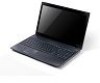

Related Acer Aspire 5336 Manual Pages
Download the free PDF manual for Acer Aspire 5336 and other Acer manuals at ManualOwl.com
Quick Start Guide - Page 5
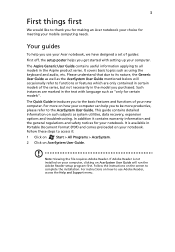
... meeting your mobile computing needs.
Your guides
To help you use your Acer notebook, we have designed a set of guides:
First off, the setup poster helps you get started with setting up your computer.
The Aspire Generic User Guide contains useful information applying to all models in the Aspire product series. It covers basic topics such as using the keyboard and audio, etc...
Quick Start Guide - Page 7
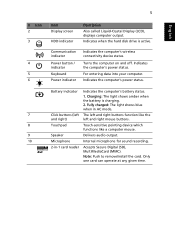
... Liquid-Crystal Display (LCD), displays computer output.
Indicates when the hard disk drive is active.
Communication indicator
Power button / indicator
Keyboard Power indicator
Indicates the computer's wireless connectivity device status.
Turns the computer on and off. Indicates the computer's power status.
For entering data into your computer. Indicates the computer's power status.
Battery...
Service Guide - Page 1
Aspire 5336 Series Service Guide
Service guide files and updates are available on the ACER/CSD web; for more information,
please refer to http://csd.acer.com.tw
PRINTED IN TAIWAN
Service Guide - Page 11
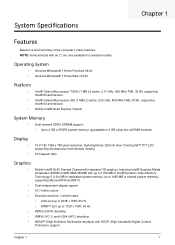
...® 64 architecture
• Mobile Intel® GL40 Express Chipset
System Memory
• Dual-channel DDR3 SDRAM support: • Up to 2 GB of DDR3 system memory, upgradable to 4 GB using two soDIMM modules
Display
•
•
15.6" HD 1366 x 768 pixel resolution, high-brightness (200-nit) Acer CineCrystal™ TFT LCD, supporting simultaneous multi-window viewing
16:9 aspect ratio...
Service Guide - Page 14
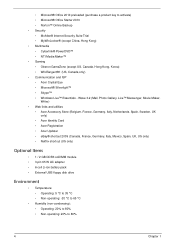
...8226; McAfee® Internet Security Suite Trial &#...Acer Identity Card • Acer Registration • Acer Updater • eBay® shortcut 2009 (Canada, France, Germany, Italy, Mexico, Spain, UK, US only) • Netflix shortcut (US only)
Optional Items
• 1 / 2 GB DDR3 soDIMM module • 3-pin 65 W AC adapter • 6-cell Li-ion battery pack • External USB floppy disk drive...
Service Guide - Page 38
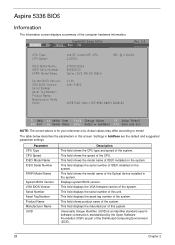
... shows the speed of the CPU. This field shows the model name of IDEO installed on the system. This field displays the serial number of IDEO installed on the system. This field shows the model name of the Optical device installed in the system. Displays system BIOS version. This field displays the VGA firmware version of the system. This field displays the serial number of this unit...
Service Guide - Page 45
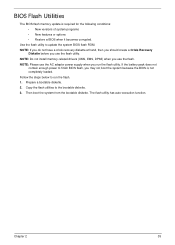
...: • New versions of system programs • New features or options • Restore a BIOS when it becomes corrupted.
Use the flash utility to update the system BIOS flash ROM. NOTE: If you do not have a crisis recovery diskette at hand, then you should create a Crisis Recovery
Diskette before you use the flash utility. NOTE: Do not install memory-related drivers (XMS, EMS, DPMI...
Service Guide - Page 52
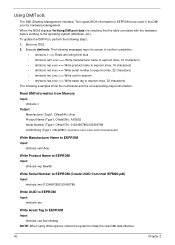
Using DMITools
The DMI (Desktop Management Interface) Tool copies BIOS information to EEPROM to be used in the DMI pool for hardware management. When the BIOS displays Verifying DMI pool data it is checking that the table correlates with the hardware before sending to the operating system (Windows, etc.). To update the DMI Pool, perform the following steps...
Service Guide - Page 89
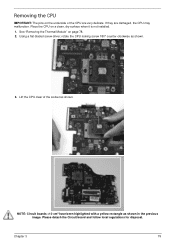
... are damaged, the CPU may malfunction. Place the CPU on a clean, dry surface when it is not installed. 1. See "Removing the Thermal Module" on page 78. 2. Using a flat-bladed screw driver, rotate the CPU locking screw 180° counter-clockwise as shown.
3. Lift the CPU clear of the socket as shown.
NOTE: Circuit boards >10 cm²...
Service Guide - Page 150
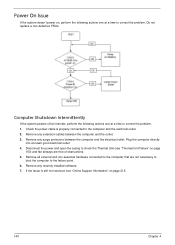
... Failure" on page
150) and fan airways are free of obstructions. 5. Remove all external and non-essential hardware connected to the computer that are not necessary to
boot the computer to the failure point. 6. Remove any recently installed software. 7. If the Issue is still not resolved, see "Online Support Information" on page 215.
140
Chapter 4
Service Guide - Page 152
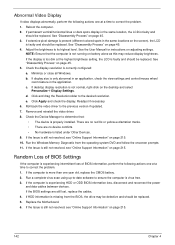
... battery. 2. Run a complete virus scan using up-to-date software to ensure the computer is virus free. 3. If the computer is experiencing HDD or ODD BIOS information loss, disconnect and reconnect the power
and data cables between devices. If the BIOS settings are still lost, replace the cables. 4. If HDD information is missing from the BIOS, the drive may be defective and should...
Service Guide - Page 155
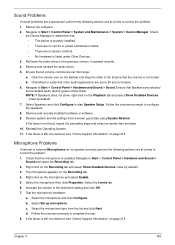
... to determine that: • The device is properly installed. • There are no red Xs or yellow exclamation marks. • There are no device conflicts. • No hardware is listed under Other Devices.
3. Roll back the audio driver to the previous version, if updated recently. 4. Remove and reinstall the audio driver. 5. Ensure that all volume controls are set mid range:
a. Click the...
Service Guide - Page 156
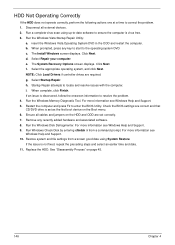
...prompted, press any key to start to the operating system DVD. c. The Install Windows screen displays. Click Next. d. Select Repair your computer. e. The System Recovery Options screen displays. Click Next. f. Select the appropriate operating system, and click Next. NOTE: Click Load Drivers if controller drives are required. g. Select Startup Repair. h. Startup Repair attempts to locate and resolve...
Service Guide - Page 158
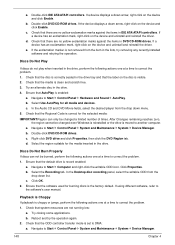
... click Enable.
b. Double-click DVD/CD-ROM drives. If the device displays a down arrow, right-click on the device and click Enable.
c. Check that there are no yellow exclamation marks against the items in lDE ATA/ATAPI controllers. If a device has an exclamation mark, right-click on the device and uninstall and reinstall the driver.
d. Check that there are no...
Service Guide - Page 161
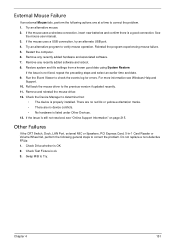
... the Event Viewer to check the events log for errors. For more information see Windows Help and
Support. 10. Roll back the mouse driver to the previous version if updated recently. 11. Remove and reinstall the mouse driver. 12. Check the Device Manager to determine that:
• The device is properly installed. There are no red Xs or yellow exclamation...
Service Guide - Page 162
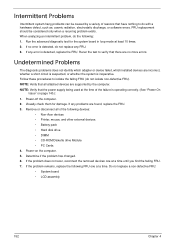
... any problems are found, replace the FRU. 3. Remove or disconnect all of the following devices:
• Non-Acer devices • Printer, mouse, and other external devices • Battery pack • Hard disk drive • DIMM • CD-ROM/Diskette drive Module • PC Cards 4. Power-on the computer. 5. Determine if the problem has changed. 6. If the problem does not recur, reconnect the...
Service Guide - Page 164
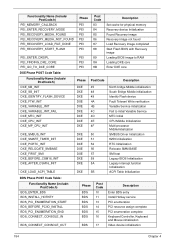
...Description
Set cache for physical memory Recovery device Initialization Found Recovery image Recovery image not found Load Recovery Image completed Start Flash BIOS with Recovery image Loading BIOS image to RAM Loading DXE ...entry Install Hotkey service PCI enumeration PCI resource assign complete PCI enumeration complete Keyboard Controller, Keyboard and Mouse initialization Video device ...
Service Guide - Page 172
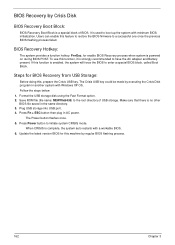
... with Windows XP OS. Follow the steps below: 1. Format the USB storage disk using the Fast Format option. 2. Save ROM file (file name: NEW70x64.fd) to the root directory of USB storage. Make sure that there is no other BIOS file saved in the same directory. 3. Plug USB storage into USB port. 4. Press Fn + ESC button then plug in AC power.
The Power button flashes...
Service Guide - Page 223
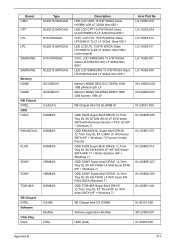
... 1066 1GB phantom p/n LF
Memory NONE SO-DIMM DDRIII 1066 2GB dummy 1066 LF
KN.1GB00.003 KN.2GB00.001
NB Chipset Intel CS GL40NB A1
KI.G4501.009
ODD HLDS Super-Multi DRIVE 12.7mm Tray DL 8X GT32N (R5-2) LF W/O bezel SATA with Renesas solution + PCC LD (HF + Windows 7)
ODD PANASONIC Super-Multi...
Service Guide - Page 225
.... These can be obtained directly from Acer CSD Taiwan. Acer's Website offers you convenient and valuable support resources whenever you need them. In the Technical Information section you can download information on all of Acer's Notebook, Desktop and Server models including:
• Service guides for all models • Bios updates • Software utilities • Spare parts lists •...