
Epson PowerLite 715c driver and firmware
Related Epson PowerLite 715c Manual Pages
Download the free PDF manual for Epson PowerLite 715c and other Epson manuals at ManualOwl.com
Technical Brief (Multimedia Projectors) - Page 1
...controls M ELP Link IV software M Flexible installation M EasyMP and EasyMP.net
Image Quality-Superior brightness
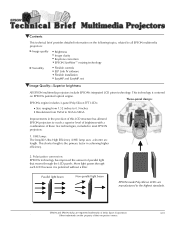
All EPSON multimedia projectors include EPSON's integrated LCD prism technology. This technology is centered
on EPSON's patented optical engine.
Three-panel design:
EPSON's engine includes 3-panel Poly-Silicon TFT LCD's:
LL
Size ranging from 1.32 inches to 0.9 inches Resolutions...
Technical Brief (Multimedia Projectors) - Page 5
... copies of preselected images Change the cursor shape Play a selected sound effect Create a spotlight effect on the screen Clear previous effects Create a macro for a specific sequence of key strokes
2. Control the following projector features: Change projector settings Change the test pattern Specify an image gamma Create a user logo
Versatility-Flexible installation
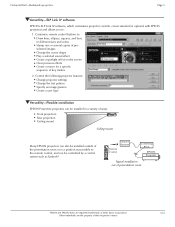
EPSON PowerLite projectors...
Technical Brief (Multimedia Projectors) - Page 6
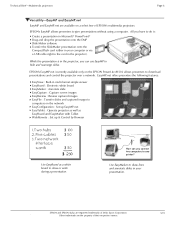
... presentation onto the CompactFlash card (either in your computer or via a USB cable right to the card in the projector.)
While the presentation is in the projector, you can use EasyMP to hide and rearrange slides.
EPSON's EasyMP.net (currently available only on the EPSON PowerLite 8150i) allows presenters to download presentations and control the projector over a network. EasyMP.net offers...
Installation Guide - ELPMBUNI Universal Mount Assembly - Page 4
... 4)
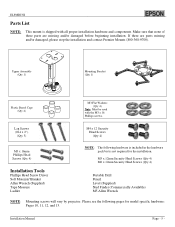
Installation Tools
Phillips Head Screw Driver Soft Material...installation.
M5 x 12mm Security Head Screws (Qty 4) M6 x 12mm Security Head Screws (Qty 4)
Portable Drill Pencil Level (Supplied) Stud Finder (Commercially Available) M5 Allen Wrench
NOTE: Mounting screws will vary by projector. Please see the following pages for model specific hardware: Pages 10, 11, 12, and 13.
Installation Manual...
Product Information Guide - Page 8
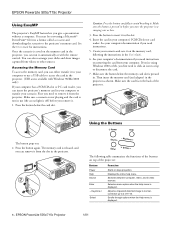
... projector's memory card. See the User's Guide for instructions.
Once the scenario is saved on the memory card in the projector, you can run it automatically or with the remote control. You can also rearrange your slides and show images captured from videos or other sources.
Accessing the Memory Card
To access the memory card, you can either transfer it to your computer or use a USB cable...
Quick Start - Page 2
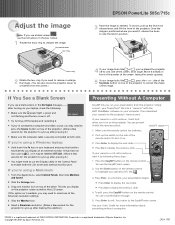
... SlideMaker software on your computer. Then download your scenario to the projector's memory card.
If your scenario is set to autorun, it will start when you turn on the projector. You can present it with the remote control.
1. Make sure the remote control has batteries.
2. Push up the switch on the side of the remote control to turn it on.
Press Enter to display the...
User Manual - Page 6
...36 Spotlighting Your Image 37 Using Horizontal and Vertical Highlights 37
Using the Remote Control as a Wireless Mouse 38
Creating Presentations for Your Projector. . . 39
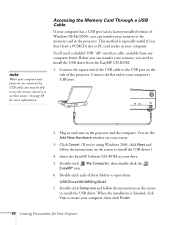
Accessing the Memory Card 40 Moving the Memory Card from the Projector to Your Computer 40 Accessing the Memory Card Through a USB Cable . . . 42
Installing EasyMP 43 System Requirements 43 Installing the Software 43
iv
User Manual - Page 13
...instructions you need to get your projector set up and connected to a laptop or PowerBook computer.
s Built-in help system Provides assistance for common problems. Available from the Help button on the projector or the remote control. See page 90 for details.
s support.epson.com Download FAQs and e-mail your questions to EPSON support.
s CD-ROMs Your projector comes with two CD-ROMs. The PowerLite...
User Manual - Page 48
4Creating Presentations for Your Projector The projector's EasyMP feature lets you give a presentation without a computer. Once you install the software, you can drag and drop a PowerPoint file to convert it into a format called a scenario. Then you can download the scenario to the projector's memory card and run it automatically or with the remote control. Or, you can create a scenario from ...
User Manual - Page 49
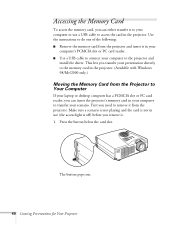
... card reader. s Use a USB cable to connect your computer to the projector and
install the driver. This lets you transfer your presentation directly to the memory card in the projector. (Available with Windows 98/Me/2000 only.)
Moving the Memory Card from the Projector to Your Computer
If your laptop or desktop computer has a PCMCIA slot or PC card reader, you can insert the projector's memory card...
User Manual - Page 51
note
When your computer and projector are connected by USB cable, you may be able to use the remote control as a wireless mouse. See page 38 for more information.
Accessing the Memory Card Through a USB Cable
If your computer has a USB port (and a factory-installed version of Windows 98/Me/2000), you can transfer your scenario to the memory card in the projector. This method is especially useful ...
User Manual - Page 52
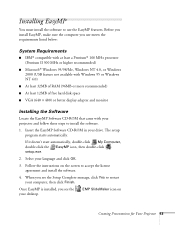
... with Windows 95 or Windows NT 4.0)
s At least 32MB of RAM (96MB or more recommended)
s At least 12MB of free hard disk space s VGA (640 × 480) or better display adapter and monitor
Installing the Software
Locate the EasyMP Software CD-ROM that came with your projector and follow these steps to install the software.
1. Insert the EasyMP Software CD-ROM in your drive. The setup program...
User Manual - Page 53
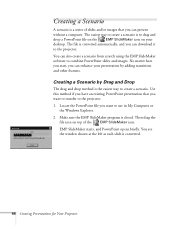
...computer. The easiest way to create a scenario is to drag and drop a PowerPoint file on the EMP SlideMaker icon on your desktop. The file is converted automatically, and you can download it to the projector...PowerPoint presentation that you want to transfer to the projector. 1. Locate the PowerPoint file you want to use in My Computer or
the Windows Explorer. 2. Make sure the EMP SlideMaker program ...
User Manual - Page 55
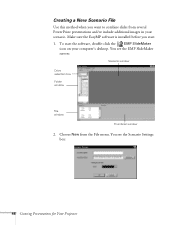
... in your scenario. Make sure the EasyMP software is installed before you start. 1. To start the software, double-click the EMP SlideMaker
icon on your computer's desktop. You see the EMP SlideMaker screen:
Scenario window Drive selection box Folder window
File window
Thumbnail window
2. Choose New from the File menu. You see the Scenario Settings box:
46 Creating Presentations for Your...
User Manual - Page 61
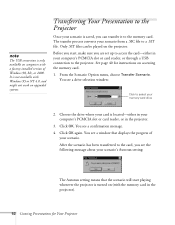
..., make sure you are set up to access the card-either in your computer's PCMCIA slot or card reader, or through a USB connection to the projector. See page 40 for instructions on accessing the memory card.
1. From the Scenario Option menu, choose Transfer Scenario. You see a drive selection window:
Click to select your memory card drive
2. Choose the drive where your card is located-either in your...
User Manual - Page 105
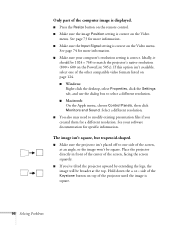
... match the projector's native resolution (800 × 600 on the PowerLite 505c). If this option isn't available, select one of the other compatible video formats listed on page 124. s Windows:
Right-click the desktop, select Properties, click the Settings tab, and use the dialog box to select a different resolution. s Macintosh: On the Apple menu, choose Control Panels, then...
User Manual - Page 109
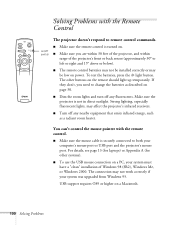
... both your computer's mouse port or USB port and the projector's mouse port. For details, see page 13 (for laptops) or Appendix A (for other systems).
s To use the USB mouse connection on a PC, your system must have a "clean" installation of Windows 98 (SR2), Windows Me, or Windows 2000. The connection may not work correctly if your system was upgraded from Windows 95.
USB support requires OS9...
User Manual - Page 110
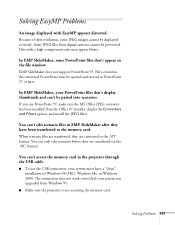
... transferred (in the .SIC format).
You can't access the memory card in the projector through the USB cable.
s To use the USB connection, your system must have a "clean" installation of Windows 98 (SR2), Windows Me, or Windows 2000. The connection may not work correctly if your system was upgraded from Windows 95.
s Make sure the projector is not accessing the memory card.
Solving Problems 101
Product Support Bulletin(s) - Page 5
EPSON PRODUCT SUPPORT BULLETIN
Date: PSB #: Reference: Product(s): Subject:
03/27/2002 PSB.2002.03.004A TI01-35e, Rev. A PowerLite 715c and PowerLite 505c EasyMP SlideMaker update to Version 1.20
Originator: JAM Authorization:
Total Pages: 1
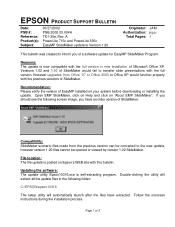
This bulletin was created to inform you of a software update for EasyMP SlideMaker Program.
Reasons: The update is now compatible with the full version or...
Product Support Bulletin(s) - Page 11
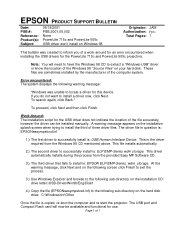
... and browse to the following sub-directory on the installation CD: drive letter:\USB-Driver\Win98\Eng\Disk1
4.) Copy the file (EPSONeasympstvxd.inf) to the following sub-directory on the hard disk drive: C:\Windows\Inf\Other
Once the file is copied, re-boot the computer and re-start the projector. The USB port and Compact Flash card will now be available and functional for use...