
Sony DSC-W290 - Cyber-shot Digital Camera driver and firmware
Drivers and firmware downloads for this Sony item
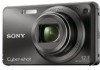
Related Sony DSC-W290 Manual Pages
Download the free PDF manual for Sony DSC-W290 and other Sony manuals at ManualOwl.com
Instruction Manual - Page 4
... and product safety is Sony Deutschland GmbH, Hedelfinger Strasse 61, 70327 Stuttgart, Germany. For any service or guarantee matters please refer to the addresses given in separate service or guarantee documents.
This product has been tested and found compliant with the limits set out in the EMC Directive for using connection cables shorter than 3 meters
4GB...
Instruction Manual - Page 10

... (1)
• Power cord (mains lead) (1) (not supplied in the USA and Canada)
• Rechargeable battery pack NP-BG1 (1)/ Battery case (1)
• USB, A/V cable for multi-use terminal (1)
• Soft carrying case (1) (DSC-W275 only)
• CD-ROM (1) - Cyber-shot application software - "Cyber-shot Handbook" - "Cyber-shot Step-up Guide"
• Instruction Manual (this manual) (1)
x Using...
Instruction Manual - Page 33
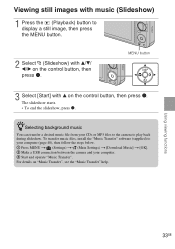
... file from your CDs or MP3 files to the camera to play back during slideshow. To transfer music files, install the "Music Transfer" software (supplied) to your computer (page 40), then follow the steps below. 1 Press MENU t (Settings) t (Main Settings) t [Download Music] t [OK]. 2 Make a USB connection between the camera and your computer. 3 Start and operate "Music Transfer". For details on...
Instruction Manual - Page 38
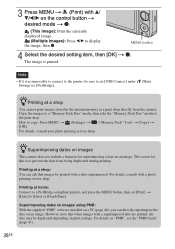
... display the image, then z.
MENU button
4 Select the desired setting item, then [OK] t z. The image is printed.
Note
• If it was impossible to connect to the printer, be sure to set [USB Connect] under Settings) to [PictBridge].
(Main
zPrinting at a shop
You cannot print images stored in the internal memory at a print shop directly from the camera.
Copy...
Instruction Manual - Page 39
... details, see the "PMB Guide" (page 41).
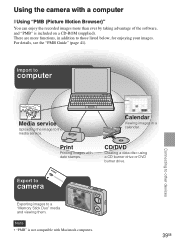
Import to
computer
Media service
Uploading the image to the media service.
Print
Printing images with date stamps.
Calendar
Viewing images in a calendar.
CD/DVD
Creating a data disc using a CD burner drive or DVD burner drive.
Connecting to other devices
Export to
camera
Exporting images to a "Memory Stick Duo" media and viewing...
Instruction Manual - Page 40

... 500 MB Display: Screen resolution: 1,024 × 768 dots or more Video memory: 32 MB or more (Recommended: 64 MB or more) *1 64-bit editions and Starter (Edition) are not supported. *2 Starter (Edition) is not supported.
2 Turn on your computer, and insert the CD-ROM (supplied) into the CD-ROM drive. The installation menu screen appears.
3 Click [Install]. The "Choose Setup Language...
Instruction Manual - Page 42
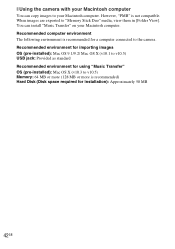
... for a computer connected to the camera. Recommended environment for importing images OS (pre-installed): Mac OS 9.1/9.2/ Mac OS X (v10.1 to v10.5) USB jack: Provided as standard Recommended environment for using "Music Transfer" OS (pre-installed): Mac OS X (v10.3 to v10.5) Memory: 64 MB or more (128 MB or more is recommended) Hard Disk (Disk space required for installation): Approximately 50...
Instruction Manual - Page 48
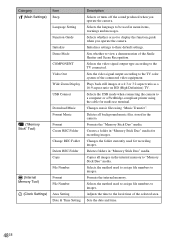
... on HD (High Definition) TV.
Selects the USB mode when connecting the camera to a computer or a PictBridge-compliant printer using the cable for multi-use terminal.
Changes music files using "Music Transfer".
Deletes all background music files stored in the camera.
Formats the "Memory Stick Duo" media.
Creates a folder in "Memory Stick Duo" media for recording images.
Changes the folder...
Instruction Manual - Page 52
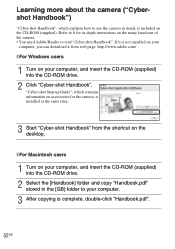
... in-depth instructions on the many functions of the camera. • You need Adobe Reader to read "Cyber-shot Handbook". If it is not installed on your
computer, you can download it from web page: http://www.adobe.com/
x For Windows users
1 Turn on your computer, and insert the CD-ROM (supplied) into the CD-ROM drive.
2 Click "Cyber-shot Handbook". "Cyber-shot Step-up Guide", which contains...
Instruction Manual - Page 54
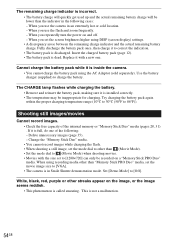
...) when shooting movies. • Movies with the size set to [1280×720] can only be recorded on a "Memory Stick PRO Duo" media. When using recording media other than "Memory Stick PRO Duo" media, set the movie image size to [VGA]. • The camera is in Smile Shutter demonstration mode. Set [Demo Mode] to [Off].
White, black, red, purple...
Instruction Manual - Page 58
....
Trademarks
• The following marks are trademarks of Sony
Corporation.
, "Cyber-shot," "Memory
Stick," , "Memory Stick PRO,"
, "Memory Stick Duo,"
, "Memory Stick PRO
Duo,"
, "Memory
Stick PRO-HG Duo,"
, "Memory Stick
Micro," "MagicGate,"
,
"PhotoTV HD," "Info LITHIUM"
• Microsoft, Windows, DirectX and Windows
Vista are either registered trademarks or
trademarks of...