
Acer Aspire 7110 driver and firmware
Drivers and firmware downloads for this Acer Computers item
Related Acer Aspire 7110 Manual Pages
Download the free PDF manual for Acer Aspire 7110 and other Acer manuals at ManualOwl.com
Aspire 7110 - 9410 User's Guide EN - Page 14
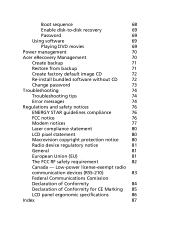
Boot sequence
68
Enable disk-to-disk recovery
69
Password
69
Using software
69
Playing DVD movies
69
Power management
70
Acer eRecovery Management
70
Create backup
71
Restore from backup
71
Create factory default image CD
72
Re-install bundled software without CD
72
Change password
73
Troubleshooting
74
Troubleshooting tips
74
Error messages
74
Regulations and safety ...
Aspire 7110 - 9410 User's Guide EN - Page 35
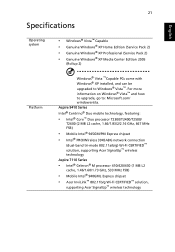
... cache, 1.66/1.83/2/2.16 GHz, 667 MHz FSB)
• Mobile Intel® 945GM/PM Express chipset
• Intel® PRO/Wireless 3945ABG network connection
(dual-band tri-mode 802.11a/b/g) Wi-Fi CERTIFIED™ solution, supporting Acer SignalUp™ wireless technology
Aspire 7110 Series
• Intel® Celeron® M processor 410/420/430 (1 MB L2
cache, 1.46/1.60/1.73 GHz...
Aspire 7110 - 9410 User's Guide EN - Page 36
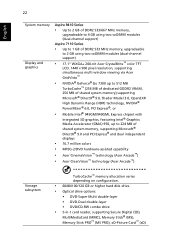
...ClearVision™ technology (Acer Arcade™)
Storage subsystem
TurboCache™ memory allocation varies depending on configuration.
• 60/80/100/120 GB or higher hard disk drive • Optical drive options:
• DVD-Super Multi double-layer • DVD-Dual double-layer • DVD/CD-RW combo drive
• 5-in-1 card reader, supporting Secure Digital (SD),
MultiMediaCard (MMC...
Aspire 7110 - 9410 User's Guide EN - Page 53
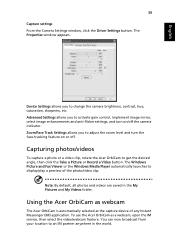
... or Record a Video button. The Windows Picture and Fax Viewer or the Windows Media Player automatically launches to display/play a preview of the photo/video clip.
Note: By default, all photos and videos are saved in the My Pictures and My Videos folder.
Using the Acer OrbiCam as webcam
The Acer OrbiCam is automatically selected as the capture device...
Aspire 7110 - 9410 User's Guide EN - Page 59
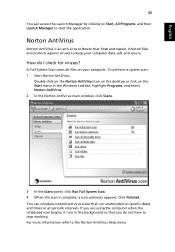
... for viruses?
A Full System Scan scans all files on your computer. To perform a system scan: 1 Start Norton AntiVirus.
Double click on the Norton AntiVirus Icon on the desktop or click on the Start menu in the Windows taskbar, highlight Programs, and select Norton AntiVirus. 2 In the Norton AntiVirus main window, click Scans.
3 In the Scans panel, click Run Full...
Aspire 7110 - 9410 User's Guide EN - Page 61
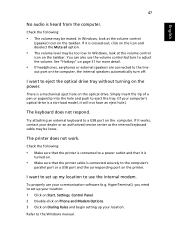
... port or a USB port and the corresponding port on the printer.
I want to set up my location to use the internal modem.
To properly use your communication software (e.g. HyperTerminal), you need to set up your location: 1 Click on Start, Settings, Control Panel. 2 Double-click on Phone and Modem Options. 3 Click on Dialing Rules and begin setting up your location.
Refer to the Windows manual...
Aspire 7110 - 9410 User's Guide EN - Page 62
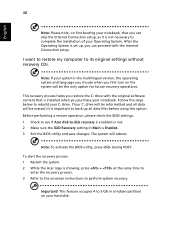
... the Internet Connection setup.
I want to restore my computer to its original settings without recovery CDs.
Note: If your system is the multilingual version, the operating system and language you choose when you first turn on the system will be the only option for future recovery operations.
This recovery process helps you restore the C: drive with the original software content...
Aspire 7110 - 9410 User's Guide EN - Page 83
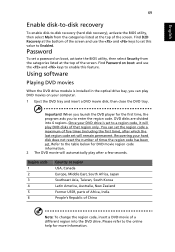
....
Password
To set a password on boot, activate the BIOS utility, then select Security from the categories listed at the top of the screen. Find Password on boot: and use the and keys to enable this feature.
Using software
Playing DVD movies
When the DVD drive module is installed in the optical drive bay, you can play DVD movies on your computer...
Aspire 7110 - 9410 User's Guide EN - Page 84
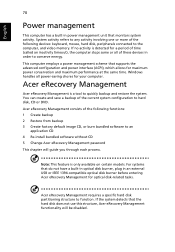
... CD 4 Re-install bundled software without CD 5 Change Acer eRecovery Management password
This chapter will guide you through each process.
Note: This feature is only available on certain models. For systems that do not have a built-in optical disk burner, plug in an external USB or IEEE 1394-compatible optical disk burner before entering Acer eRecovery Management for optical disk-related tasks...
Aspire 7110 - 9410 User's Guide EN - Page 86
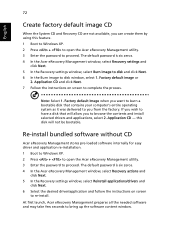
... software without CD
Acer eRecovery Management stores pre-loaded software internally for easy driver and application re-installation. 1 Boot to Windows XP. 2 Press + to open the Acer eRecovery Management utility. 3 Enter the password to proceed. The default password is six zeros. 4 In the Acer eRecovery Management window, select Recovery actions and
click Next. 5 In the Recovery settings window...
Aspire 7110 - 9410 User's Guide EN - Page 101
... 33
F
FAQ. See frequently-asked questions frequently-asked questions 46 front view 16
H
Hibernation mode hotkey 32
hotkeys 31
K
keyboard 30 embedded numeric keypad 30 hotkeys 31 lock keys 30 troubleshooting 47 Windows keys 31
L
left view 16
M
media access on indicator 26
memory installing 68
messages error 74
modem 65
N
network 66 Notebook Manager
hotkey 32 num...
Aspire 9410 - 7110 and TravelMate 5610 - 5110 Service Guide - Page 10
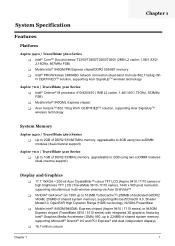
... (2MB L2 cache, 1.66/1.83/2/ 2.16GHz, 667MHz FSB) T Mobile Intel® 945GM/PM Express chipsetDDR2 533/667 memory T Intel® PRO/Wireless 3945ABG network connection (dual-band tri-mode 802.11a/b/g) WiFi CERTIFIEDTM solution, supporting Acer SignalUpTM wireless technology
Aspire 7110 / TravelMate 5110 Series T Intel® Celeron® M processor 410/420/430 (1MB L2 cache, 1.46/1.60/1.73GHz...
Aspire 9410 - 7110 and TravelMate 5610 - 5110 Service Guide - Page 41
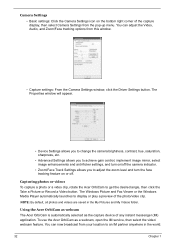
... Record a Video button. The Windows Picture and Fax Viewer or the Windows Media Player automatically launches to display or play a preview of the photo/video clip.
NOTE: By default, all photos and videos are saved in the My Pictures and My Videos folder.
Using the Acer OrbiCam as webcam The Acer OrbiCam is automatically selected as the capture device...
Aspire 9410 - 7110 and TravelMate 5610 - 5110 Service Guide - Page 47
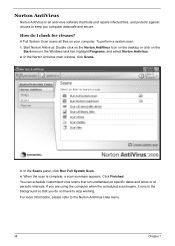
... anti-virus software that finds and repairs infected files, and protects against viruses to keep you computer data safe and secure.
How do I check for viruses?
A Full System Scan scans all files on your computer. To perform a system scan:
1. Start Norton Antivirus: DoNuoblretcolinckAonntthieVNirourtson AntiVirus Icon on the desktop or click on the StaStratrt menu in the Windows task...
Aspire 9410 - 7110 and TravelMate 5610 - 5110 Service Guide - Page 85
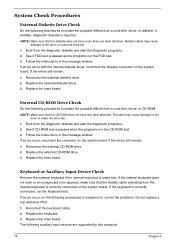
... the instructions in the message window. If errors occur with the internal diskette driver, reconnect the diskette connector on the system board. If the errors still remain: 1. Reconnect the external diskette drive. 2. Replace the external diskette driver. 3. Replace the main board.
External CD-ROM Drive Check
Do the following procedures to isolate the possible effects from a controller, driver...
Aspire 9410 - 7110 and TravelMate 5610 - 5110 Service Guide - Page 86
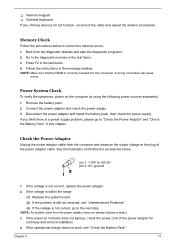
... the instructions in the message window. NOTE: Make sure that the DIMM is correctly inserted into the connector. A wrong connection will cause
errors.
Power System Check
To verify the symptoms, power on the computer by using the following power sources separately. 1. Remove the battery pack. 2. Connect the power adaptor and check the power supply. 3. Disconnect the power adaptor and install the...
Aspire 9410 - 7110 and TravelMate 5610 - 5110 Service Guide - Page 87
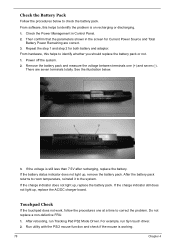
...software, this helps to identify the problem is on recharging or discharging.
1. Check the Power Management in Control Panel. 2. Then confirm that the parameters shown in the screen for Current Power Source and Total
Battery Power... light up, replace the AC/DC charger board.
Touchpad Check
If the touchpad does not ... PS2 Mode Driver. For example, run Syn touch driver. 2. Run utility with the PS...
Aspire 9410 - 7110 and TravelMate 5610 - 5110 Service Guide - Page 98
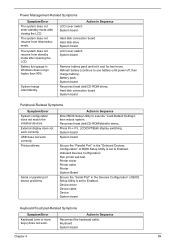
...
Reconnect hard disk/CD-ROM drives. Hard disk connection board System board
Peripheral-Related Symptoms
Symptom/Error System configuration does not match the installed devices. External display does not work correctly. USB does not work correctly. Print problems
Serial or parallel port device problems.
Action in Sequence
Enter BIOS Setup Utility to execute "Load Default Settings", then reboot...
Aspire 9420/9410/7110 User's Guide EN - Page 88
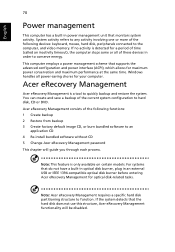
...-install bundled software without CD 5 Change Acer eRecovery Management password
This chapter will guide you through each process.
Note: This feature is only available on certain models. For systems that do not have a built-in optical disk burner, plug in an external USB or IEEE 1394-compatible optical disk burner before entering Acer eRecovery Management for optical disk-related tasks.
Note: Acer...
Aspire 9420/9410/7110 User's Guide EN - Page 90
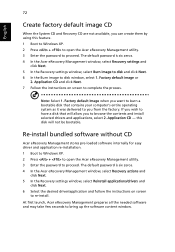
... software without CD
Acer eRecovery Management stores pre-loaded software internally for easy driver and application re-installation. 1 Boot to Windows XP. 2 Press + to open the Acer eRecovery Management utility. 3 Enter the password to proceed. The default password is six zeros. 4 In the Acer eRecovery Management window, select Recovery actions and
click Next. 5 In the Recovery settings window...