
Foxconn A74MX-S driver and firmware
Related Foxconn A74MX-S Manual Pages
Download the free PDF manual for Foxconn A74MX-S and other Foxconn manuals at ManualOwl.com
English manual - Page 6
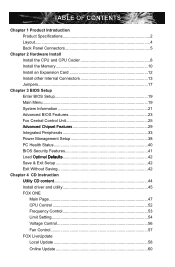
... 40 BIOS Security Features 41 Load �O�p�t�im��a�l��D�e�f�a�u�l�ts 42 Save & Exit Setup 42 Exit Without Saving 42
Chapter 4 CD Instruction ......U.t.ili.ty..C.D..c.o.n.te.n.t 44
Install driver and utility 45 FOX ONE
Main Page 47 CPU Control 52 Frequency Control 53 Limit Setting 54...
English manual - Page 7
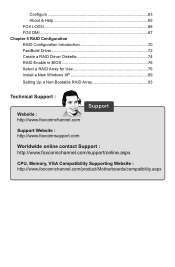
...a RAID Driver Diskette 74 RAID Enable in BIOS 76 Select a RAID Array for Use 76 Install a New Windows XP 89
Setting Up a Non-Bootable RAID Array 93
Technical Support :
Website : http://www.foxconnchannel.com
Support
Support Website : http://www.foxconnsupport.com
Worldwide online contact Support : http://www.foxconnchannel.com/support/online.aspx
CPU, Memory, VGA Compatibility Supporting...
English manual - Page 10
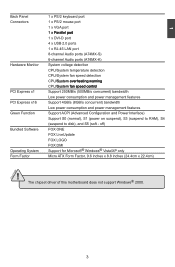
...) Support S0 (normal), S1 (power on suspend), S3 (suspend to RAM), S4
(suspend to disk), and S5 (soft - off) Bundled Software FOX ONE FOX LiveUpdate FOX LOGO FOX DMI Operating System Support for Microsoft® Windows® Vista/XP only Form Factor Micro ATX Form Factor, 9.6 inches x 8.8 inches (24.4cm x 22.4cm)
! The chipset driver of this motherboard does not support Windows...
English manual - Page 13
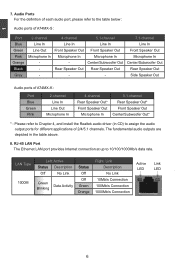
.../Subwoofer Out*
* : Please refer to Chapter 4, and install the Realtek audio driver (in CD) to assign the audio output ports for different applications of 2/4/5.1 channels. The fundamental audio outputs are depicted in the table above.
8. RJ-45 LAN Port The Ethernet LAN port provides Internet connection at up to 10/100/1000Mb/s data rate.
LAN Type
Left: Active
Status Description
Off
No Link...
English manual - Page 19
... an Expansion Card
!
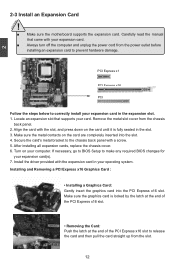
■ Make sure the motherboard supports the expansion card. Carefully read the manual that came with your expansion card.
■ Always turn off the computer and unplug the power cord from the power outlet before installing an expansion card to prevent hardware damage.
PCI Express x1
PCI Express x16
PCI
Follow the steps below to correctly install your expansion card in the...
English manual - Page 29
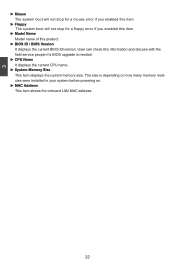
... ID/version. User can check this information and discuss with the field service people if a BIOS upgrade is needed.
► CPU Name It displays the current CPU name.
► System Memory Size This item displays the current memory size. The size is depending on how many memory modules were installed in your system before powering on.
► MAC Address This item shows the onboard LAN MAC address...
English manual - Page 50
The utility CD that came with the motherboard contains useful software and several utility drivers that enhance the motherboard features.
This chapter includes the following information: ■ Utility CD content ■ Install driver and utility ■ FOX ONE ■ FOX LiveUpdate ■ FOX LOGO ■ FOX DMI
Note : Because each module is independent, so the section number...
English manual - Page 51
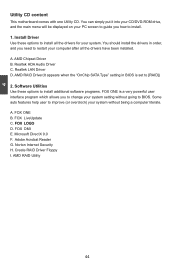
..., and you need to restart your computer after all the drivers have been installed. A. AMD Chipset Driver B. Realtek HDA Audio Driver C. Realtek LAN Driver D. AMD RAID Driver(It appears when the "OnChip SATA Type" setting in BIOS is set to [RAID]) 2. Software Utilities Use these options to install additional software programs. FOX ONE is a very powerful user interface program which allows you to...
English manual - Page 65
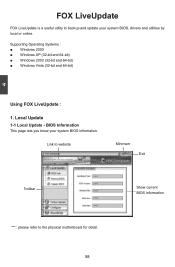
... is a useful utility to backup and update your system BIOS, drivers and utilities by local or online.
Supporting Operating Systems : ■ Windows 2000 ■ Windows XP (32-bit and 64-bit) ■ Windows 2003 (32-bit and 64-bit) ■ Windows Vista (32-bit and 64-bit)
4
Using FOX LiveUpdate :
1. Local Update 1-1 Local Update - BIOS Information
This page lets you know...
English manual - Page 67
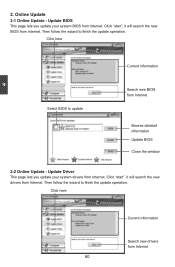
... Update - Update BIOS
This page lets you update your system BIOS from Internet. Click "start", it will search the new BIOS from Internet. Then follow the wizard to finish the update operation.
Click here
4
Current information
Select BIOS to update
Search new BIOS from Internet
Browse detailed information Update BIOS Close the window
2-2 Online Update - Update Driver This page lets you update...
English manual - Page 68
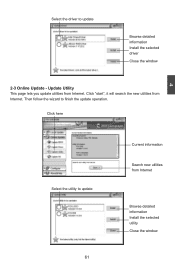
... driver to update
Browse detailed information Install the selected driver
Close the window
2-3 Online Update - Update Utility This page lets you update utilities from Internet. Click "start", it will search the new utilities from Internet. Then follow the wizard to finish the update operation.
Click here
4
Select the utility to update 61
Current information
Search new utilities from Internet...
English manual - Page 69
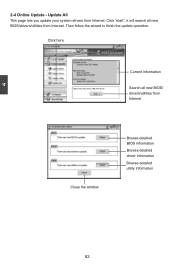
...2-4 Online Update - Update All This page lets you update your system drivers from Internet. Click "start", it will search all new BIOS/drivers/utilities from Internet. Then follow the wizard to finish the update operation.
Click here
Current information
Search all new BIOS/ drivers/utilities from Internet
Close the window
Browse detailed BIOS information
Browse detailed driver information
Browse...
English manual - Page 71
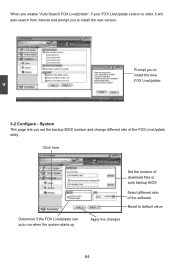
... prompt you to install the new version.
4
Prompt you to install the new FOX LiveUpdate
3-2 Configure - System This page lets you set the backup BIOS location and change different skin of the FOX LiveUpdate utility.
Click here
Determine if the FOX LiveUpdate can auto run when the system starts up
Set the location of download files or...
English manual - Page 75
...65533;r�o�d�u��c�ti�o�n� ■ FastBuild Driver ■ Create a RAID Driver Diskette ■ RAID Enable in BIOS ■ Select a RAID Array for use ■ Install a New Windows XP ■ Setting up a Non-Bootable RAID Array
The RAID BIOS Setup pictures shown in this chapter are for reference only, please refer to the practical...
English manual - Page 76
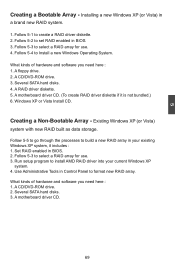
... existing Windows XP system, it includes : 1. Set RAID enabled in BIOS. 2. Follow 5-3 to select a RAID array for use. 3. Run setup program to install AMD RAID driver into your current Windows XP
system. 4. Use Administrative Tools in Control Panel to format new RAID array. What kinds of hardware and software you need here : 1. A CD/DVD-ROM drive. 2. Several SATA hard disks. 3. A motherboard driver...
English manual - Page 81
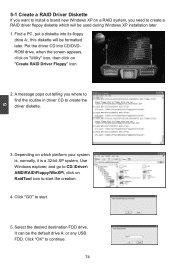
... which platform your system is, normally, it is a 32-bit XP system. Use Windows explorer, and go to CD:\Driver\ AMD\RAID\Floppy\WinXP\, click on RaidTool icon to start the creation.
4. Click "GO" to start.
5. Select the desired destination FDD drive. It can be the default drive A: or any USB FDD. Click "OK" to continue.
74
English manual - Page 96
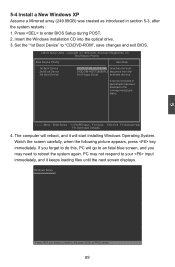
... restarts : 1. Press to enter BIOS Setup during POST. 2. Insert the Windows installation CD into the optical drive. 3. Set the "1st Boot Device" to "CD/DVD-ROM", save changes and exit BIOS.
CMOS Setup Utility - Copyright (C) 1985-2006, American Megatrends, Inc. Boot Device Priority
Boot Device Priority Item Help
1st Boot Device 2nd Boot Device 3rd Boot Device
[CDR/DOVMD]: SS-DVD...
English manual - Page 97
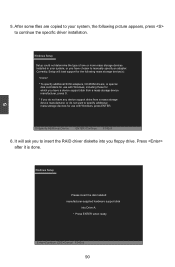
...or more mass storage devices installed in your system, or you have chosen to manually specify an adapter. Currently, Setup will load support for the following mass storage device(s): * To specify additional SCSI adapters, CD-ROM drivers, or special disk controllers for use with Windows, including those for which you have a device support disk from a mass storage device manufacturer, press S. * If...
English manual - Page 101
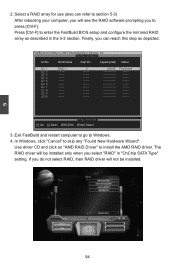
...;] Down [ESC] Exit [Enter] Select
3. Exit FastBuild and restart computer to go to Windows. 4. In Windows, click "Cancel" to skip any "Found New Hardware Wizard".
Use driver CD and click on "AMD RAID Driver" to install the AMD RAID driver. The RAID driver will be installed only when you select "RAID" in "OnChip SATA Type" setting. If you do not select RAID, then RAID driver will not be...
English manual - Page 102
5
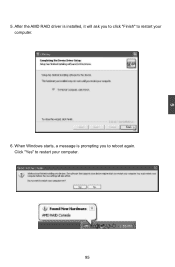
5. After the AMD RAID driver is installed, it will ask you to click "Finish" to restart your computer.
6. When Windows starts, a message is prompting you to reboot again. Click "Yes" to restart your computer.
95