
Asus P5G41T-M LX V2 driver and firmware


Related Asus P5G41T-M LX V2 Manual Pages
Download the free PDF manual for Asus P5G41T-M LX V2 and other Asus manuals at ManualOwl.com
User Manual - Page 2
.../or LGPL Software, which will be no earlier than December 1, 2011, either (1) for free by downloading it from http://support.asus.com/download; or (2) for the cost of reproduction and shipment, which is dependent on the preferred carrier and the location where you want to have it shipped to, by sending a request to: ASUSTeK Computer Inc...
User Manual - Page 3
Contents
Notices...vi Safety information vii About this guide vii P5G41T-M LX Series specifications summary ix
Chapter 1: Product introduction 1.1 Welcome 1-1 1.2 Package contents 1-1 1.3 Special features 1-1
1.3.1 Product highlights 1-1 1.3.2 Innovative ASUS features 1-2 1.4 Before you proceed 1-4 1.5 Motherboard overview 1-5 1.5.1 Placement direction 1-5 1.5.2 Screw holes 1-5 1.5.3 ...
User Manual - Page 4
... Master/Slave, SATA1~4 2-7 2.3.4 Storage Configuration 2-8 2.3.5 System Information 2-9 2.4 Advanced menu 2-9 2.4.1 JumperFree Configuration 2-9 2.4.2 CPU Configuration 2-11 2.4.3 Chipset 2-12 2.4.4 Onboard Devices Configuration 2-13 2.4.5 USB Configuration 2-14 2.4.6 PCI PnP 2-15 2.5 Power menu 2-15 2.5.1 Suspend Mode 2-15 2.5.2 ACPI 2.0 Support 2-15 2.5.3 ACPI APIC Support 2-15
iv
User Manual - Page 6
...limits for a Class B digital device, pursuant to Part 15 of the FCC Rules. These limits are designed to provide reasonable protection against harmful interference in a residential installation. This equipment generates, ... the dealer or an experienced radio/TV technician for help.
The use of shielded cables for connection of the monitor to the graphics card is required to assure compliance with ...
User Manual - Page 7
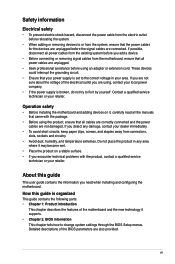
... to fix it by yourself. Contact a qualified service technician or your retailer.
Operation safety
• Before installing the motherboard and adding devices on it, carefully read all the manuals that came with the package.
• Before using the product, ensure that all cables are correctly connected and the power cables are not damaged. If you detect any damage...
User Manual - Page 8
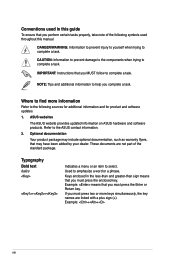
...complete a task.
IMPORTANT: Instructions that you MUST follow to complete a task.
NOTE: Tips and additional information to help you complete a task.
Where to find more information
Refer to the following sources for additional information and for product and software updates.
1. ASUS websites
The ASUS website provides updated information on ASUS hardware and software products. Refer to...
User Manual - Page 9
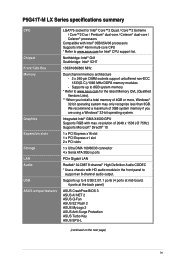
P5G41T-M LX Series specifications summary
CPU
Chipset Front Side Bus Memory
Graphics Expansion slots Storage LAN Audio USB ASUS unique features
LGA775 socket for Intel® Core™2 Quad / Core™2 Extreme / Core™2 Duo / Pentium® dual-core / Celeron® dual-core / Celeron® processors
Compatible with Intel® 05B/05A/06 processors Supports Intel® 45nm multi-...
User Manual - Page 10
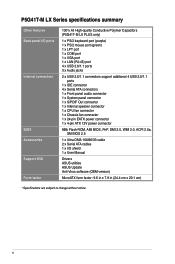
... 1 x Internal speaker connector 1 x CPU fan connector 1 x Chassis fan connector 1 x 24-pin EATX power connector 1 x 4-pin ATX 12V power connector
8Mb Flash ROM, AMI BIOS, PnP, DMI 2.0, WfM 2.0, ACPI 2.0a, SM BIOS 2.5
1 x Ultra DMA 100/66/33 cable 2 x Serial ATA cables 1 x I/O shield 1 x User Manual
Drivers ASUS utilities ASUS Update Anti-Virus software (OEM version)
MicroATX form factor: 9.6 in...
User Manual - Page 11
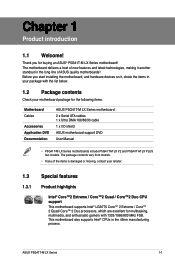
... installing the motherboard, and hardware devices on it, check the items in your package with the list below.
1.2 Package contents
Check your motherboard package for the following items.
Motherboard Cables
Accessories Application DVD Documentation
ASUS P5G41T-M LX Series motherboard 2 x Serial ATA cables 1 x Ultra DMA 100/66/33 cable 1 x I/O shield ASUS motherboard support DVD User Manual...
User Manual - Page 13
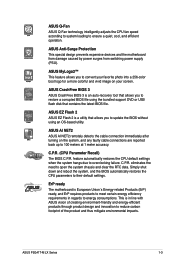
... USB flash disk that contains the latest BIOS file.
ASUS EZ Flash 2 ASUS EZ Flash 2 is a utility that allows you to update the BIOS without using an OS-based utility.
ASUS AI NET2 ASUS AI NET2 remotely detects the cable connection immediately after turning on the system, and any faulty cable connections are reported back up to 100 meters at 1 meter accuracy.
C.P.R. (CPU Parameter Recall) The BIOS...
User Manual - Page 18
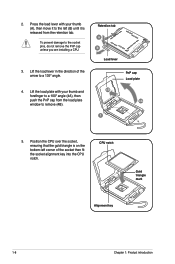
... cap unless you are installing a CPU.
3. Lift the load lever in the direction of the arrow to a 135º angle.
4. Lift the load plate with your thumb and forefinger to a 100º angle (4A), then push the PnP cap from the load plate window to remove (4B).
Retention tab A B
Load lever
PnP cap Load plate 4B
4A
3
5. Position...
User Manual - Page 23
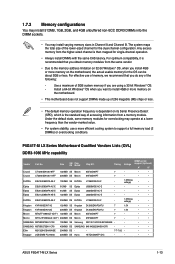
...Windows® OS.
-
Install a 64-bit Windows® OS when you want to install 4GB or more memory on
the motherboard.
• This motherboard does not support DIMMs made up of 256 megabits (Mb) chips or less.
• The default memory operation frequency is dependent on its Serial... 2GB DIMM PC3-8500
2048MB DS Hynix
H5TQ1G83AFP G7C
-
-
•
•
ASUS P5G41T-M LX Series
1-13
User Manual - Page 27
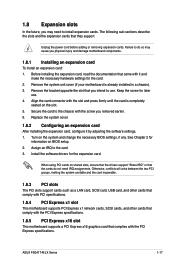
... a LAN card, SCSI card, USB card, and other cards that comply with PCI specifications.
1.8.4 PCI Express x1 slot
This motherboard supports PCI Express x1 network cards, SCSI cards, and other cards that comply with the PCI Express specifications.
1.8.5 PCI Express x16 slot
This motherboard supports a PCI Express x16 graphics card that complies with the PCI Express specifications.
ASUS P5G41T-M LX...
User Manual - Page 34
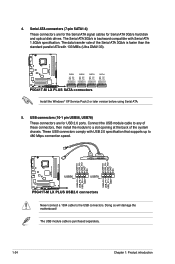
...ATA signal cables for Serial ATA 3Gb/s hard disk and optical disk drives. The Serial ATA 3Gb/s is backward compatible with Serial ATA 1.5Gb/s specification. The data transfer rate of the Serial ATA 3Gb/s is faster than the standard parallel ATA with 133 MB/s (Ultra DMA133).
P5G41T-M LX PLUS SATA connectors
Install the Windows® XP Service Pack 2 or later version before using Serial ATA.
5. USB...
User Manual - Page 37
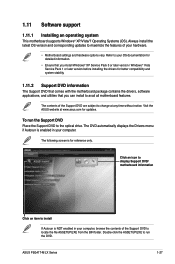
... with the motherboard package contains the drivers, software applications, and utilities that you can install to avail all motherboard features.
The contents of the Support DVD are subject to change at any time without notice. Visit the ASUS website at www.asus.com for updates.
To run the Support DVD Place the Support DVD to the optical drive. The DVD automatically displays the Drivers menu...
User Manual - Page 39
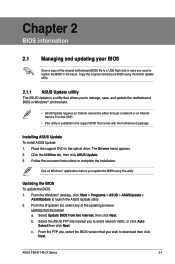
... a network or an Internet Service Provider (ISP).
• This utility is available in the support DVD that comes with the motherboard package.
Installing ASUS Update To install ASUS Update: 1. Place the support DVD in the optical drive. The Drivers menu appears. 2. Click the Utilities tab, then click ASUS Update. 3. Follow the onscreen instructions to complete the installation.
Quit all Windows...
User Manual - Page 40
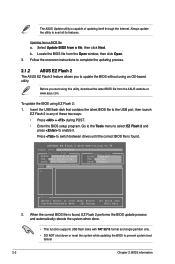
... USB port, then launch EZ Flash 2 in any of these two ways:
• Press + during POST.
• Enter the BIOS setup program. Go to the Tools menu to select EZ Flash 2 and press to enable it.
Press to switch between drives until the correct BIOS file is found.
ASUSTek EZ Flash 2 BIOS ROM Utility V3.36
FLASH TYPE: EON 25P/F80
Current ROM
BOARD: P5G41T-M LX...
User Manual - Page 41
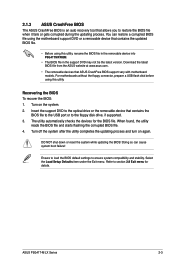
...removable devices that ASUS CrashFree BIOS support vary with motherboard models. For motherboards without the floppy connector, prepare a USB flash disk before using this utility.
Recovering the BIOS To recover the BIOS: 1. Turn on the system. 2. Insert the support DVD to the optical drive or the removable device that contains the
BIOS file to the USB port or to the floppy disk drive, if supported...
User Manual - Page 42
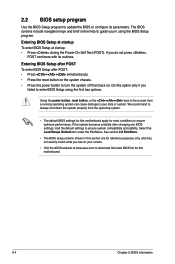
... the BIOS Setup program to update the BIOS or configure its parameters. The BIOS screens include navigation keys and brief online help to guide you in using the BIOS Setup program.
Entering BIOS Setup at startup To enter BIOS Setup at startup: • Press during the Power-On Self Test (POST). If you do not press ,
POST continues with its routines.
Entering BIOS Setup after...
User Manual - Page 55
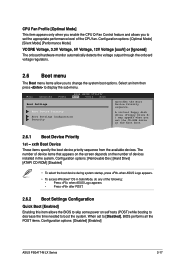
...then press to display the sub-menu.
Main
Advanced
Power
BIOS SETUP UTILITY Boot Tools Exit
Boot Settings
Boot Device Priority
Boot Settings Configuration Security
Specifies the Boot Device Priority sequence.
A virtual floppy disk drive (Floppy Drive B: ) may appear when you set the CD-ROM drive as the first boot device.
2.6.1 Boot Device Priority
1st ~ xxth Boot Device
These items specify...