
Epson Stylus Pro 10600 - UltraChrome Ink - Stylus Pro 10600 Print Engine driver and firmware
Drivers and firmware downloads for this Epson item

Related Epson Stylus Pro 10600 - UltraChrome Ink Manual Pages
Download the free PDF manual for Epson Stylus Pro 10600 - UltraChrome Ink and other Epson manuals at ManualOwl.com
Printer Guide - Page 4

...Ink Cartridges 1-12 Loading the Roll Paper 1-16 Connecting the Printer to Your Computer 1-21
Connecting to the USB Port 1-22 Connecting to the Parallel Port (Windows Only 1-23 Connecting to the IEEE 1394 (FireWire) Port 1-24 Connecting to the Ethernet Port 1-25 Installing the Printer Software 1-26 Installing the Software for Macintosh 1-26 Installing the Software for Windows 1-29 Setting...
Printer Guide - Page 11
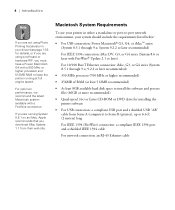
...• 256MB of RAM (at least 512MB recommended)
• At least 8GB available hard disk space to install the software and process files (60GB or more recommended)
• Quad-speed (4×) or faster CD-ROM or DVD drive for installing the printer software
• For USB connection: a compliant USB port and a shielded USB "AB" cable from Series A (computer) to Series B (printer), up to 6.6 ft...
Printer Guide - Page 12
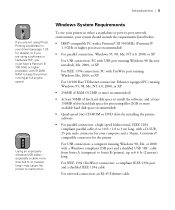
...ROM or DVD drive for installing the printer software
• For parallel connection: a high-speed bidirectional, IEEE-1284 compliant parallel cable, 6 to 10 ft. (1.8 to 3 m) long, with a D-SUB, 25-pin, male connector for your computer and a 36-pin, Centronics® compatible connector for the printer
For USB connection: a computer running Windows 98, Me, or 2000 with a Windows compliant USB port...
Printer Guide - Page 36
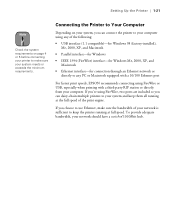
... 1394 (FireWire) interface-for Windows Me, 2000, XP, and Macintosh
• Ethernet interface-for connection through an Ethernet network or directly to any PC or Macintosh equipped with a 10/100 Ethernet port
For fastest print speeds, EPSON recommends connecting using FireWire or USB, especially when printing with a third-party RIP station or directly from your computer. If you're using FireWire...
Printer Guide - Page 44
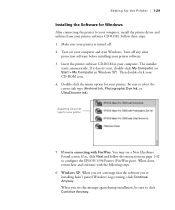
... before installing your printer software. 3. Insert the printer software CD-ROM in your computer. The installer
starts automatically. If it doesn't start, double-click My Computer (or Start > My Computer in Windows XP). Then double-click your CD-ROM icon. 4. Double-click the menu option for your printer. Be sure to select the correct ink type (Archival Ink, Photographic Dye Ink, or UltraChrome Ink...
Printer Guide - Page 147
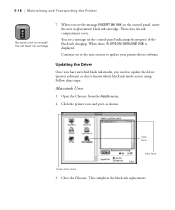
... cover.
You see a message on the control panel indicating the progress of the black ink charging. When done, K: EPSON GENUINE INK is displayed.
Continue on to the next section to update your printer driver software.
Updating the Driver
Once you have switched black ink modes, you need to update the driver (printer software) so that it knows which black ink mode you're using. Follow these steps...
Product Brochure - Page 7
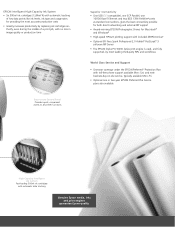
... possible for both direct networking and external RIP support Award-winning EPSON Photographic Drivers for Macintosh® and Windows® High-speed HPGL/2 plotting support with included ZEHPlot DriverB Optional EFI Fiery Spark Professional 2.0 Adobe® PostScript® 3 software RIP Server The EPSON Stylus Pro 10000 Series print engine is used, and fully supported, by most leading third...
Product Information Guide - Page 3
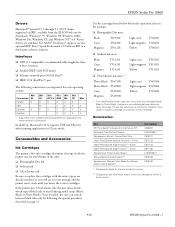
...-installed operating systems (not upgraded from earlier versions of Windows).
In addition, Macintosh OS X supports USB and Ethernet when running applications in Classic mode.
Consumables and Accessories
Ink Cartridges
The printer's first ink cartridges determine the type of ink the printer uses for the lifetime of the unit: ❏ Photographic Dye ink ❏ Archival ink ❏ UltraChrome...
Product Information Guide - Page 12
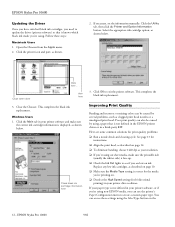
EPSON Stylus Pro 10600
Updating the Driver Once you have switched black ink cartridges, you need to update the driver (printer software) so that it knows which black ink mode you're using. Follow these steps:
Macintosh Users 1. Open the Chooser from the Apple menu. 2. Click the printer icon and port, as shown.
2. If necessary, set the information manually. Click the Utility tab, then click the ...
Quick Installation Guide - EFI FierySpark Professional 2.0 RIP - Page 3

... the Server 8 Enabling File and Printer Sharing 10 Enabling AppleTalk Protocol 10 Installing ColorWise Pro Tools on the Server 11
Installing the Windows Client Software 13 Installing the PostScript Printer Driver 14 Installing Command WorkStation 15 Installing ColorWise Pro Tools 15 Installing Fiery Downloader 16 Enabling Two-Way Communication 17 Installing Hot Folder 18 Configuring Hot...
Quick Installation Guide - EFI FierySpark Professional 2.0 RIP - Page 4
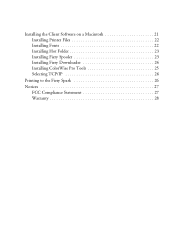
Installing the Client Software on a Macintosh 21 Installing Printer Files 22 Installing Fonts 22 Installing Hot Folder 23 Installing Fiery Spooler 23 Installing Fiery Downloader 24 Installing ColorWise Pro Tools 25 Selecting TCP/IP 26
Printing to the Fiery Spark 26
Notices 27 FCC Compliance Statement 27 Warranty 28
Quick Installation Guide - EFI FierySpark Professional 2.0 RIP - Page 17
... the Windows Client Software | 13
Installing the Windows Client Software
Follow these instructions to install the software on your Windows client workstations. This procedure installs the PostScript printer driver with a connection to the Fiery server's Hold, Print, and Direct print queues. Before you start, make sure you have installed the TCP/IP protocol and Client for Microsoft Networks and...
Quick Installation Guide - EFI FierySpark Professional 2.0 RIP - Page 21
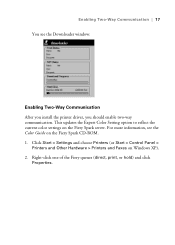
... After you install the printer driver, you should enable two-way communication. This updates the Expert Color Setting option to reflect the current color settings on the Fiery Spark server. For more information, see the Color Guide on the Fiery Spark CD-ROM. 1. Click Start > Settings and choose Printers (or Start > Control Panel >
Printers and Other Hardware > Printers and Faxes on Windows XP...
Quick Installation Guide - EFI FierySpark Professional 2.0 RIP - Page 22
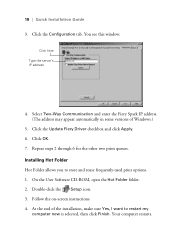
... enter the Fiery Spark IP address. (The address may appear automatically in some versions of Windows.)
5. Click the Update Fiery Driver checkbox and click Apply. 6. Click OK. 7. Repeat steps 2 through 6 for the other two print queues. Installing Hot Folder Hot Folder allows you to store and reuse frequently-used print options. 1. On the User Software CD-ROM, open the Hot Folder...
Quick Installation Guide - EFI FierySpark Professional 2.0 RIP - Page 27
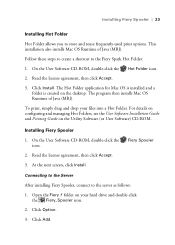
... Mac OS is installed and a folder is created on the desktop. The program then installs Mac OS Runtime of Java (MRJ).
To print, simply drag and drop your files into a Hot Folder. For details on configuring and managing Hot Folders, see the User Software Installation Guide and Printing Guide on the Utility Software (or User Software) CD-ROM.
Installing Fiery Spooler
1. On the User Software CD-ROM...
Quick Reference Guide - EFI FierySpark Professional 2.0 RIP - Page 3
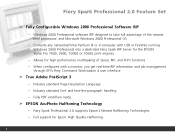
...Professional Software RIP
- Windows 2000 Professional software RIP designed to take full advantage of the newest Intel processors' and Microsoft Windows 2000 Professional OS
- Converts any networked Intel Pentium III or 4 computer with USB or FireWire running Windows 2000 Professional into a dedicated Fiery Spark RIP Server for the EPSON Stylus Pro 7600, 9600, 10000 or 10600 print engines
- Allows...
Quick Reference Guide - EFI FierySpark Professional 2.0 RIP - Page 23
... Set
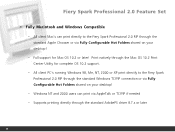
➤ Fully Macintosh and Windows Compatible
- All client Mac's can print directly to the Fiery Spark Professional 2.0 RIP through the standard Apple Chooser or via Fully Configurable Hot Folders shared on your desktop!
- Full support for Mac OS 10.2 or later! Print natively through the Mac OS 10.2 Print Center Utility for complete OS 10.2 support.
- All client PC's running Windows...
Quick Reference Guide - EFI FierySpark Professional 2.0 RIP - Page 32

... Feature Set
Frequently Asked Questions
If I already own the Fiery Spark Pro RIP 1.0 version for the SP10000, how can Upgrade to version 2.0?
Answer: You get a FREE upgrade. Simply go to www.prographics.epson.com and purchase the DEMO version to receive your updated install CD's. Or visit your local dealer, they might have copies for you to take. Or visit Epson at one...
Product Support Bulletin - Page 1
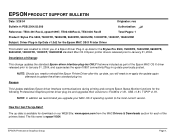
... again afterward to update the drivers standard plug-ins.
Reason:
This Update stabilizes Epson driver Interface communications during printing and corrects Epson Status Monitor functions for the following Professional Graphics printer driver plug-ins and upgrades their versions to: FireWire v1.81, USB v1.81, TCPIP v1.81.
NOTE: In addition we recommend you upgrade your MAC OS-X operating system...
Product Support Bulletin - Page 21
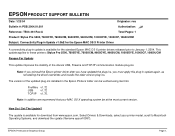
... the updated plug-ins installed in the Epson Printers folder can be verified using Get Info:
FireWire v1.72
USB
v1.72
TCP/IP v1.75.
Note: In addition we recommend that your MAC OS X operating system be at the most current version.
How Do I Get The Update?
The update is available for download from www.epson.com. Select Drivers & Downloads, select your printer...