
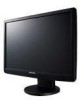
Samsung 2243WM - SyncMaster - 22" LCD Monitor driver and firmware
Drivers and firmware downloads for this Samsung item
Related Samsung 2243WM Manual Pages
Download the free PDF manual for Samsung 2243WM and other Samsung manuals at ManualOwl.com
Quick Guide (ENGLISH) - Page 21
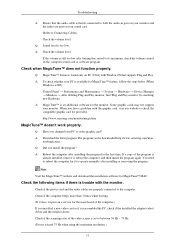
... does, request an a service for the main board of the computer.) If you installed a new video card or if you assembled the PC, check if the installed the adapter(video) driver and the monitor driver. Check if the scanning ratio of the video screen is set to between 56 Hz ~ 75 Hz. (Do not exceed 75 Hz when using the maximum resolution.)
51
User Manual (ENGLISH) - Page 24
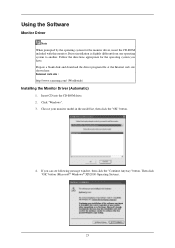
... Follow the directions appropriate for the operating system you have. Prepare a blank disk and download the driver program file at the Internet web site shown here. Internet web site : http://www.samsung.com/ (Worldwide)
Installing the Monitor Driver (Automatic)
1. Insert CD into the CD-ROM drive. 2. Click "Windows". 3. Choose your monitor model in the model list, then click the "OK" button.
4. If...
User Manual (ENGLISH) - Page 25
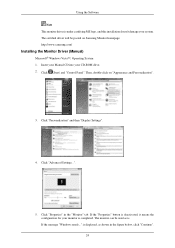
... driver will be posted on Samsung Monitor homepage. http://www.samsung.com/
Installing the Monitor Driver (Manual)
Microsoft® Windows Vista™, Operating System 1. Insert your Manual CD into your CD-ROM drive. 2. Click (Start) and "Control Panel". Then, double-click on "Appearance and Personalization".
3. Click "Personalization" and then "Display Settings".
4. Click "Advanced Settings...
User Manual (ENGLISH) - Page 26
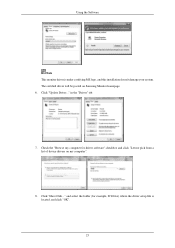
..., and this installation doesn't damage your system. The certified driver will be posted on Samsung Monitor homepage. 6. Click "Update Driver..." in the "Driver" tab.
7. Check the "Browse my computer for driver software" checkbox and click "Let me pick from a list of device drivers on my computer".
8. Click "Have Disk..." and select the folder (for example, D:\Drive) where the driver setup file is...
User Manual (ENGLISH) - Page 28
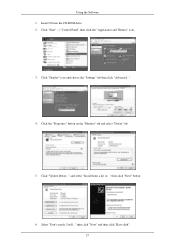
Using the Software 1. Insert CD into the CD-ROM drive. 2. Click "Start" → "Control Panel" then click the "Appearance and Themes" icon.
3. Click "Display" icon and choose the "Settings" tab then click "Advanced...".
4. Click the "Properties" button on the "Monitor" tab and select "Driver" tab.
5. Click "Update Driver..." and select "Install from a list or..." then click "Next" button.
6. ...
User Manual (ENGLISH) - Page 29
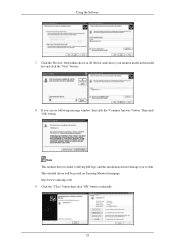
... the "Next" button.
8. If you can see following message window, then click the "Continue Anyway" button. Then click "OK" button.
Note This monitor driver is under certifying MS logo, and this installation doesn't damage your system. The certified driver will be posted on Samsung Monitor homepage. http://www.samsung.com/ 9. Click the "Close" button then click "OK" button...
User Manual (ENGLISH) - Page 30
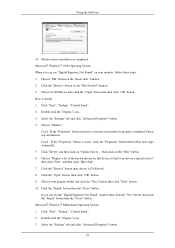
... you can see "Digital Signature Not Found" on your monitor, follow these steps. 1. Choose "OK" button on the "Insert disk" window. 2. Click the "Browse" button on the "File Needed" window. 3. Choose A:(D:\Driver) then click the "Open" button and then click "OK" button. How to install 1. Click "Start", "Setting", "Control Panel". 2. Double click the "Display" icon. 3. Select the "Settings" tab and...
User Manual (ENGLISH) - Page 32
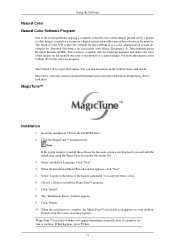
... online. You can download it from the website below and install; http://www.samsung.com/us/consumer/learningresources/monitor/naturalcolorexpert/pop_download.html
MagicTune™
Installation
1. Insert the installation CD into the CD-ROM drive. 2. Click the MagicTune™ installation file.
Note If the popup window to install the software for the main screen is not displayed, proceed with the...
User Manual (ENGLISH) - Page 33
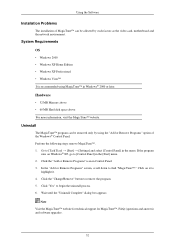
... Software
Installation Problems
The installation of MagicTune™ can be affected by such factors as the video card, motherboard and the network environment.
System Requirements OS
• Windows 2000 • Windows XP Home Edition • Windows XP Professional • Windows Vista™ It is recommended using MagicTune™ in Windows® 2000 or later.
Hardware
• 32 MB Memory...
User Manual (ENGLISH) - Page 35
Using the Software
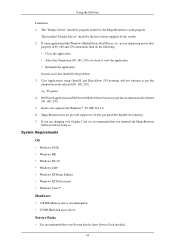
Limitation 1. The "Display Driver" should be properly loaded for the MagicRotation to work properly.
The installed "Display Driver" should be the latest driver supplied by the vendor. 2. If some applications like Windows Media Player, Real Player, etc. are not displaying movie files
properly in 90, 180 and 270 orientations then do the following : • Close the application. ...
User Manual (ENGLISH) - Page 36
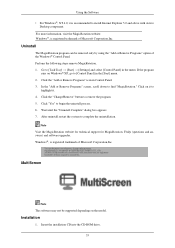
... restart the system to complete the uninstallation.
Note Visit the MagicRotation website for technical support for MagicRotation, FAQs (questions and answers) and software upgrades. Windows®, is registered trademark of Microsoft Corporation,Inc
MultiScreen
Note The software may not be supported depending on the model.
Installation
1. Insert the installation CD into the CD-ROM drive.
35
User Manual (ENGLISH) - Page 37
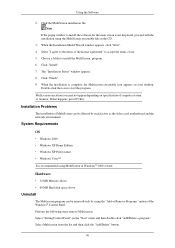
... your desktop. Double-click the icon to start the program. Multiscreen execution icon may not appear depending on specification of computer system or monitor. If that happens, press F5 Key.
Installation Problems
The installation of MultiScreen can be affected by such factors as the video card, motherboard and the network environment.
System Requirements OS
• Windows 2000 • Windows XP...
User Manual (ENGLISH) - Page 52
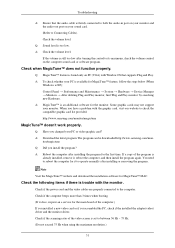
... does, request an a service for the main board of the computer.) If you installed a new video card or if you assembled the PC, check if the installed the adapter(video) driver and the monitor driver. Check if the scanning ratio of the video screen is set to between 56 Hz ~ 75 Hz. (Do not exceed 75 Hz when using the maximum resolution.)
51
Quick Guide (easy Manual) (ver.1.0) (English) - Page 17
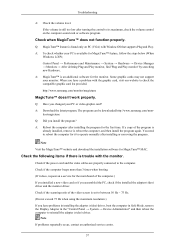
... the installed the adapter(video) driver and the monitor driver.
Check if the scanning ratio of the video screen is set to between 56 Hz ~ 75 Hz.
(Do not exceed 75 Hz when using the maximum resolution.)
If you have problems in installing the adapter (video) driver, boot the computer in Safe Mode, remove the Display Adapter in the "Control Panel → System → Device Administrator...
User Manual (user Manual) (ver.1.0) (English) - Page 20
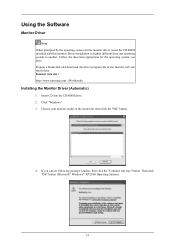
... Follow the directions appropriate for the operating system you have. Prepare a blank disk and download the driver program file at the Internet web site shown here. Internet web site : http://www.samsung.com/ (Worldwide)
Installing the Monitor Driver (Automatic)
1. Insert CD into the CD-ROM drive. 2. Click "Windows". 3. Choose your monitor model in the model list, then click the "OK" button.
4. If...
User Manual (user Manual) (ver.1.0) (English) - Page 21
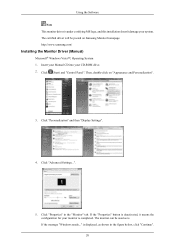
... driver will be posted on Samsung Monitor homepage. http://www.samsung.com/
Installing the Monitor Driver (Manual)
Microsoft® Windows Vista™, Operating System 1. Insert your Manual CD into your CD-ROM drive. 2. Click (Start) and "Control Panel". Then, double-click on "Appearance and Personalization".
3. Click "Personalization" and then "Display Settings".
4. Click "Advanced Settings...
User Manual (user Manual) (ver.1.0) (English) - Page 22
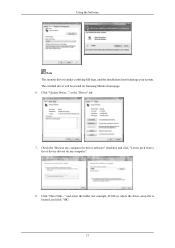
..., and this installation doesn't damage your system. The certified driver will be posted on Samsung Monitor homepage. 6. Click "Update Driver..." in the "Driver" tab.
7. Check the "Browse my computer for driver software" checkbox and click "Let me pick from a list of device drivers on my computer".
8. Click "Have Disk..." and select the folder (for example, D:\Drive) where the driver setup file is...
User Manual (user Manual) (ver.1.0) (English) - Page 26
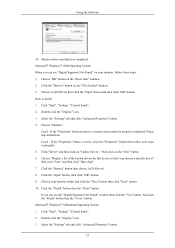
... you can see "Digital Signature Not Found" on your monitor, follow these steps. 1. Choose "OK" button on the "Insert disk" window. 2. Click the "Browse" button on the "File Needed" window. 3. Choose A:(D:\Driver) then click the "Open" button and then click "OK" button. How to install 1. Click "Start", "Setting", "Control Panel". 2. Double click the "Display" icon. 3. Select the "Settings" tab and...
User Manual (user Manual) (ver.1.0) (English) - Page 30
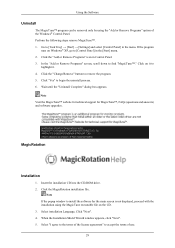
... MagicTune™ website for technical support for MagicTune™, FAQs (questions and answers) and software upgrades.
MagicRotation
Installation
1. Insert the installation CD into the CD-ROM drive. 2. Click the MagicRotation installation file.
Note If the popup window to install the software for the main screen is not displayed, proceed with the installation using the MagicTune executable file...
User Manual (user Manual) (ver.1.0) (English) - Page 58
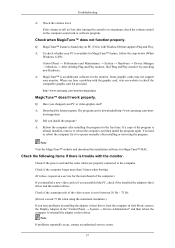
... the installed the adapter(video) driver and the monitor driver.
Check if the scanning ratio of the video screen is set to between 56 Hz ~ 75 Hz.
(Do not exceed 75 Hz when using the maximum resolution.)
If you have problems in installing the adapter (video) driver, boot the computer in Safe Mode, remove the Display Adapter in the "Control Panel → System → Device Administrator...